Choosing the right Docusign plan comes down to matching the plan to your specific workflow. Docusign offers a lot of options in 2026, and most companies that come to us are either paying for capabilities they will not use, or on a plan that does not match how they actually send envelopes. The plan you need depends on details of your workflow that are worth mapping out before you commit.
Docusign now has two distinct plan families and a few pricing dimensions to be aware of. The good news is that picking the right plan is genuinely simple once you know which two questions to ask. This guide walks you through both.
By the end of this post you will know how Docusign pricing works, which plan family makes sense for your situation, and the most common Docusign pricing questions we get from clients. Whether you are evaluating Docusign for the first time or you have a renewal coming up, this framework will give you a clear answer. If you are new to Docusign, you may want to start with our Docusign for beginners guide first.
Prefer to watch? The full video walkthrough is below.

Key Takeaways
- Docusign offers two plan families today: eSignature (signature workflow only) and IAM (signature plus automation and AI platform).
- Choose between them based on two factors: how complex your agreements are and how many envelopes you send per year.
- On IAM plans, manual envelopes are unlimited but automated envelopes are covered by an allowance of 100 per user per year. This is the key detail to plan for.
- The IAM premium covers Maestro (workflow orchestration) and Navigator (AI contract extraction). If those platform capabilities fit your workflow, IAM is the right family.
- At very high volume, eSignature plans can also fit well because per-envelope pricing is negotiable with your Docusign account team.
Table of Contents
- Key Takeaways
- What Is Docusign Pricing in 2026?
- How Does Docusign Pricing Work?
- The Two Docusign Plan Families: eSignature vs IAM
- How to Choose Your Docusign Plan
- Docusign Pricing by Plan in 2026
- Common Docusign Pricing Questions to Consider
- FAQs
- Conclusion
What Is Docusign Pricing in 2026?
Docusign pricing today is structured around two pricing dimensions and two plan families. The two dimensions are per-user per-month cost and envelope allowance. The two families are eSignature (the original signature workflow product) and IAM, which stands for Intelligent Agreement Management. IAM launched in 2024 as Docusign’s next-generation platform and includes AI features and workflow automation on top of the core signature workflow.
The most important thing to understand about Docusign pricing is that the choice between these two families is not just about features. It is about a fundamentally different way of paying for the service. eSignature is priced per envelope at scale, with envelope volume that you can negotiate separately from seats. IAM is priced per user license, with envelope allowances bundled into each license and significant differences in how manual versus automated envelopes are counted.
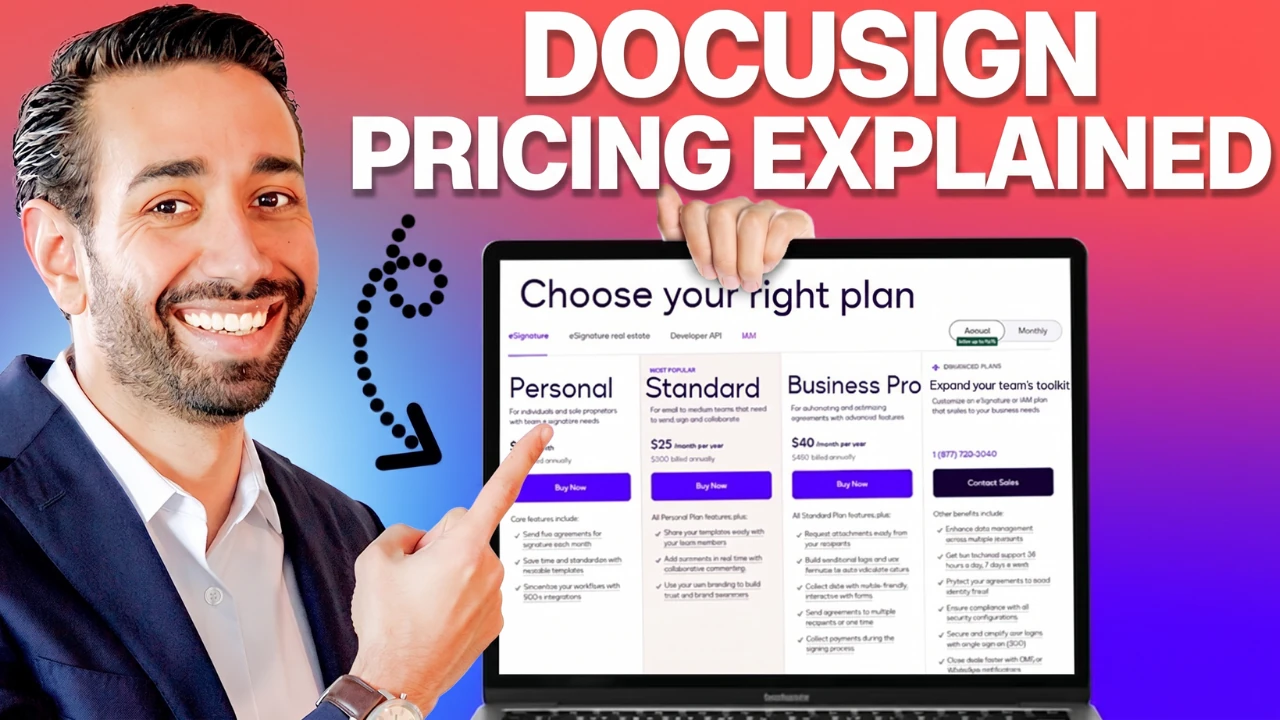
If you only look at the public pricing page, you will see prices ranging from $10 per month for Personal up to “Contact Sales” for Enterprise. That range hides the actual decision you need to make. Two companies sending similar envelope volumes could end up paying very different amounts depending on whether their workflow needs Docusign’s automation platform or just clean signature collection. We built our approach after helping hundreds of Solusign clients navigate this exact decision, drawing on the practical framework outlined on our about page.
How Does Docusign Pricing Work?
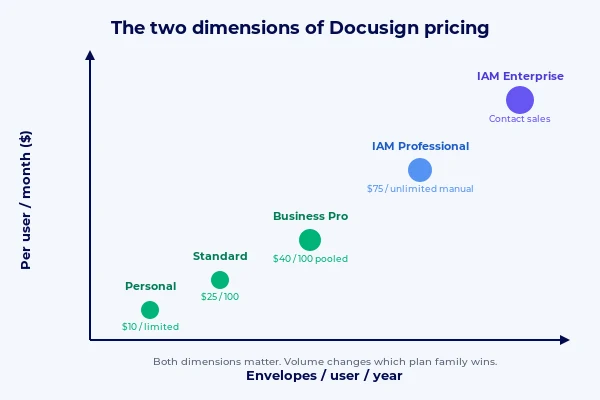
Docusign pricing has two main dimensions. The first is the cost per user per month. The second is the envelope allowance per user per year. An envelope in Docusign terms is one transaction. A single envelope can contain multiple documents and route to multiple signers, but it still counts as one envelope toward your allowance.
You can buy Docusign in two ways, and the Docusign pricing you get depends on which. Web plans (Personal, Standard, Business Pro) are sold directly on the Docusign website at fixed prices. Commercial plans (Enterprise Pro and the entire IAM family) are sold by Docusign sales reps and are negotiated based on your specific usage. The published prices on the website are rarely what companies actually pay once they enter a real negotiation.
If you exceed your envelope allowance on any plan, you pay an overage rate per additional envelope. The rate varies by contract but is commonly in the four to five dollar range. The distinction between manual envelopes and automated envelopes (more on this below) has real implications for how much you pay, so it is worth mapping your volume in both categories before choosing a plan. Docusign publishes the authoritative reference on IAM and eSignature plan allowances if you want to verify the details on your own.
The Two Docusign Plan Families: eSignature vs IAM
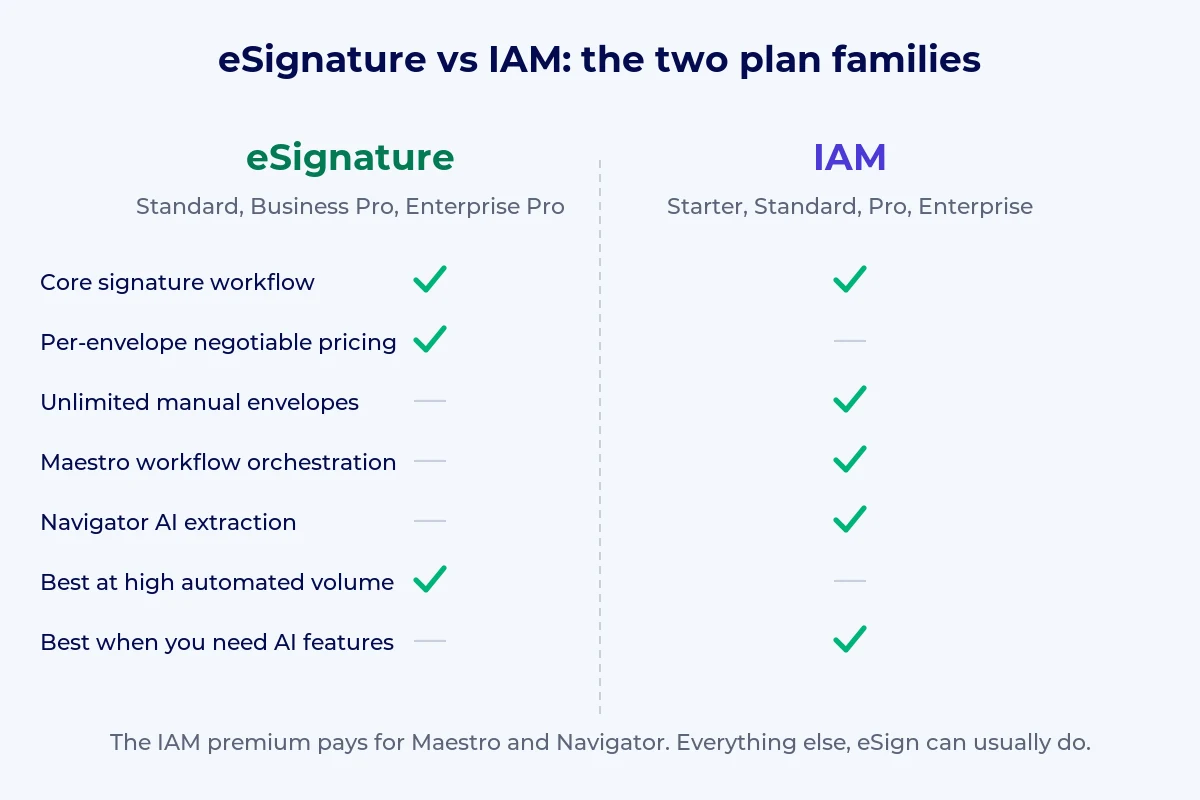
The eSignature family is the original Docusign product line. It is built around signature collection: templates, branded signing experiences, bulk send, basic web forms, and integrations through the Docusign API. Plans in this family are Personal, Standard, Business Pro, and Enterprise Pro. The pricing model favors organizations with high envelope volume because per-envelope rates drop with negotiated commitments.
The IAM family is Docusign’s newer line, structured around what they call Intelligent Agreement Management. It includes everything eSignature has, plus two important platform components: Maestro, which is Docusign’s workflow orchestration layer, and Navigator, which is the AI extraction layer that reads and analyzes signed contracts. Plans in this family are Starter, Standard, Professional, and Enterprise, with two additional variants called IAM for Sales and IAM for CX targeted at specific departments.
The key question when choosing between the two families is whether you need the platform layer. If your needs are purely signature collection, eSignature offers the lower Docusign pricing floor and easier scale. If you need workflow automation built directly into Docusign or AI-powered contract analysis, IAM is the right family even though it costs more per user.
How to Choose Your Docusign Plan
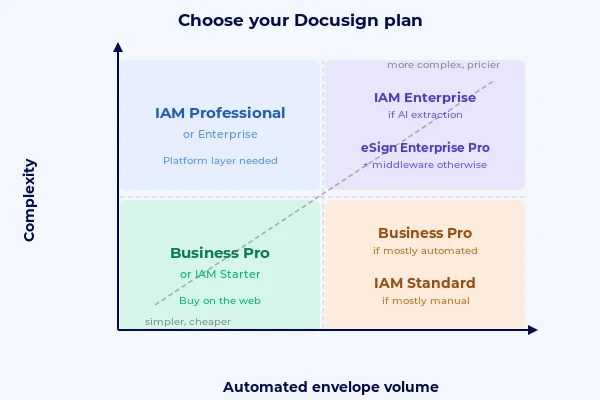
Everything you need to figure out which Docusign pricing tier is right for you comes down to two questions. How complex are your agreements? And what is your envelope volume? These two questions form a quadrant that maps every Docusign customer to the right plan.
Step 1: Assess Your Agreement Complexity
Your agreement process has low complexity if you are just collecting signatures. Your contracts do not have custom clauses, you are not collecting data from signers beyond their signature, and the same document goes to recipient after recipient with no variation. Examples: standard NDAs, simple offer letters, basic service agreements.
Your agreement process has high complexity if your contracts are dynamic. This means clauses change based on the deal, you have conditional logic in your workflow (“if this happens, then that document gets sent or this field gets hidden”), or you have multi-signer workflows where different signers see different documents. Examples: sales contracts that vary by region or product, customer applications with form fields, multi-party closing documents.
If any of that describes your work, you are in the high-complexity half of the framework.
Step 2: Calculate Your Envelope Volume
Envelope volume looks simple at first. You count how many envelopes you send per year. But Docusign treats two types of envelopes very differently, and this is where most buyers get surprised.
Manual envelopes are sent through the Docusign web app. You log in, enter signer information, attach your document, and click send. On IAM plans, manual envelopes are unlimited.
Automated envelopes are sent through any other channel. This includes API calls from a CRM, self-serve web forms or PowerForms, bulk send campaigns, and Maestro workflow triggers. On IAM plans, automated envelopes are capped at 100 per user per year.
That distinction is one of the most important things to plan for on IAM. Many companies buy IAM to automate their workflow, then find that their automated volume runs against the per-user cap sooner than expected. We recently worked with a client on IAM Enterprise whose workflow was heavily automated. During a workflow review we found their projected automated volume was going to run well over the cap. We restructured how they were sending, which brought them back within their allowance without changing their plan.
When you calculate your volume, separate it into manual and automated. The split changes which plan makes sense.
Step 3: Walk the Quadrant
Once you know your complexity level and your envelope volume (broken out by manual versus automated), you can place yourself in one of four quadrants.
Bottom-left: low volume, low complexity. eSignature Standard or IAM Starter. You just need signatures and you are not sending many. You can buy on the Docusign website and skip the sales conversation entirely.
Bottom-right: high volume, low complexity. The manual versus automated distinction decides between two options. If your high volume is mostly automated, eSignature Business Pro at commercial scale is the right answer. Per-envelope pricing drops with volume, and you do not pay for IAM features you will not use. If your high volume is mostly manual, IAM Standard wins because manual envelopes are unlimited on IAM and you would burn through Business Pro’s envelope cap.
Top-left: low volume, high complexity. The decision turns on whether you need AI extraction on your signed contracts. AI extraction lets you query things like “show me all contracts with a 30-day termination clause” or “show me deals where the discount was over 15 percent.” If you need this, IAM Professional is the right choice. If you do not need AI extraction, you can stay on eSignature Business Pro and use external middleware like Zapier, Make.com, or Power Automate to handle any workflow orchestration. This is often cheaper than IAM and more flexible.
Top-right: high volume, high complexity. Same question as top-left: do you need AI extraction? If yes, IAM Enterprise. If no, eSignature Enterprise Pro plus external middleware. At very high volume the per-envelope economics on eSignature beat IAM by a wide margin, so the decision really does hinge on whether the AI features are essential to your workflow.
Docusign Pricing by Plan in 2026
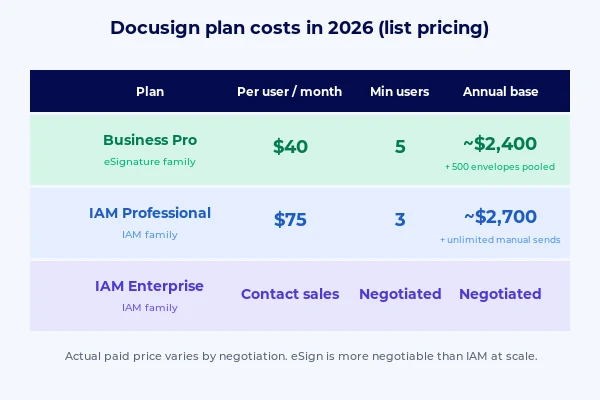
Here is the rough Docusign pricing math on the most common plans so you have real numbers to work with. All figures are based on Docusign’s public list pricing.
Docusign Business Pro is around $40 per user per month at list. Commercial plans (the ones you buy via a sales rep) start at a 5-user minimum. That works out to about $2,400 per year base. You get 100 envelopes per user per year pooled across the team, so 500 envelopes total at the floor of the commercial tier.
Docusign IAM Professional is around $75 per user per month at list, with a 3-user minimum. That works out to about $2,700 per year base. Each license includes unlimited manual envelopes and 100 automation sends per user per year.
Docusign IAM Enterprise is contact-sales only. Pricing depends entirely on your envelope volume, user count, and feature requirements. The math gets nuanced quickly because you are paying for both the platform and the volume, and the answer depends on too many specifics to publish a meaningful number here.
These numbers are list prices. What you actually pay depends on negotiation, particularly on commercial plans. Docusign publishes their current tier pricing on the official IAM plans and pricing page for reference.
Common Docusign Pricing Questions to Consider
There are a few places where teams commonly misread the Docusign pricing model. Here are the Docusign pricing questions we get asked most often.
- Understanding what “unlimited envelopes” covers. On IAM plans, manual envelopes through the web app are unlimited. Automated envelopes are covered by a per-user annual allowance. If your workflow is mostly automated, plan for this before choosing a tier.
- Checking whether features are bundled or available as add-ons. Certain features like signing groups, document visibility, send-on-behalf, and conditional routing are add-ons on both Business Pro and IAM Professional. They become bundled at IAM Enterprise. It is worth confirming with your Docusign account team which features are included on the plan you are considering.
- Deciding between Maestro and external middleware for workflow automation. Maestro is Docusign’s workflow orchestration layer and is a strong fit when you want your automation living inside the Docusign platform. For teams already using middleware like Zapier, Make.com, or Power Automate, those tools can also handle the workflow orchestration piece. Which path is right depends on your existing tech stack.
- Asking about negotiation. Commercial Docusign plans are negotiated with your account team. The published prices on the website are a starting point. If you are at meaningful volume, it is worth having an open conversation with your rep about per-envelope rates and multi-year commitments.
- Separating manual and automated envelope volume in your planning. When mapping your usage, break your envelope volume into manual and automated categories. That split affects which plan family is the best fit.
FAQs
How much does Docusign cost in 2026?
Current Docusign pricing ranges from $10 per month for the Personal plan to custom enterprise quotes. Business Pro starts at around $40 per user per month with a 5-user commercial minimum. IAM Professional starts at around $75 per user per month with a 3-user minimum. Commercial plans are negotiated, so actual cost varies based on your envelope volume and user count.
What is the difference between Docusign Business Pro and IAM Professional?
Business Pro is part of the eSignature family and includes the core signature workflow features: templates, bulk send, basic web forms, PowerForms, payments, API access. IAM Professional adds two platform components on top of those features: Maestro for workflow automation, and Navigator for AI contract extraction. IAM Professional also bundles unlimited manual envelopes (versus 100 per user per year on Business Pro). The primary reason to upgrade is the AI extraction layer.
Is IAM Standard worth it?
IAM Standard has one specific use case: high-manual-volume, low-complexity teams who need unlimited manual envelopes but do not need AI extraction. For signature-only use cases at lower volume, Business Pro is cheaper. For workflows that need the AI layer, IAM Professional is the better tier. Most companies will be better served by either Business Pro or IAM Professional, not IAM Standard.
What is the automation send allowance on IAM?
On IAM Standard, Professional, and Enterprise, the automation send allowance is 100 envelopes per user per year, pooled at the account level. An automation send is any envelope sent via API, integration, Maestro workflow, web form, PowerForm, or bulk send. Envelopes above the allowance are billed at an overage rate per envelope, commonly in the four to five dollar range. Understanding this allowance up front is important for teams with heavily automated workflows.
Can I get Maestro or Navigator on eSignature plans?
No. Maestro and Navigator are exclusive to IAM plans. There is no way to add them to an eSignature subscription. If you want these features, you need to upgrade to an IAM tier (Professional minimum for Maestro and Navigator; Enterprise for AI-Assisted Review and Agreement Desk).
How do I plan my Docusign envelope volume?
The most effective way to size your Docusign pricing accurately is to map your envelope volume and split it between manual and automated before choosing a plan. If your automated volume is high and you are on IAM, work out whether you will fit within the 100 per user per year allowance and size your seat count accordingly. If your total volume is very high, talk to your Docusign account team about a custom envelope package that matches your usage.

Conclusion: Getting Your Docusign Pricing Right
Docusign pricing has more nuance than a first look at the pricing page suggests, but the decision becomes simple once you know which questions to ask. How complex are your agreements? How many envelopes do you send per year, and what is the split between manual and automated? Those two questions place you in one of four quadrants, and each quadrant has a clear recommendation.
The biggest mistake we see is companies buying based on plan name rather than fit. The right Docusign pricing tier depends on your specific workflow, not on what the sales rep recommends. Take 20 minutes to map your actual usage before signing anything, and check whether the features you think you need are actually bundled or still paid add-ons.
If you would like help with your specific situation, you can book a free call to explore our consulting and implementation services. We will review your current setup and what you are trying to accomplish.
Otherwise, the framework in this guide gives you what you need to do it yourself. Whichever path you choose, the goal is the same: pick the plan that fits your workflow, not the one that fits your budget upfront and creates an overage surprise later.